Device lifecycle
Last edited 25 November 2026, 18:25 by Jonathan Semple
- Also called
- Device states, Device status
- Applies to
- BzC2
- BzC2b
- Tags
- concept
Contents
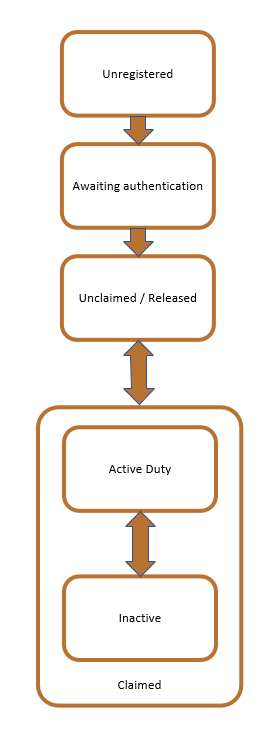
The device lifecycle is the series of states a BuzzCopper passes through on the BuzzCopper server, from first switching on to belonging to an owner.
What it does / why it matters
A new BuzzCopper isn't ready to claim the moment it is built. A Distributor first introduces it to the server and registers (commissions) it, which gives it a Service tag. Only then can an owner Claim it. Knowing the states helps you understand why a device can't be found, or why it has disappeared from a dashboard.
Key facts
| State | What it means | How it moves on |
| Unregistered | The device has contacted the server for the first time, but has no service tag yet | A distributor registers it and generates its service tag |
| Awaiting authentication | It has a service tag, but hasn't connected since | The device connects again (powered on again, or woken) |
| Unclaimed / Released | Registered and active, waiting for an owner | Someone claims it with its service tag |
| Claimed | Linked to an owner's account and on their dashboard | The owner releases it |
| Active Duty | Being used actively | The owner makes it Inactive |
| Inactive | Not in active use (development, broken, owner on holiday, end of season) | The owner makes it Active |
The service tag stays the same through every state.
How it fits with…
- Initialisation pipeline: the build stages that come before and alongside these states.
How-Tos that use this
Owners: see Transfer a device to a new owner (log in to read this page). Distributors: see Register a device and generate its service tag (requires a supplier login).